Output Tables
This module is available exclusively for Premium users.
All seven tables are incremental, partitioned on their date column, and carry an is_final column - filter is_final = TRUE for stable reporting. Every column has a BigQuery description; this page covers the semantics you need before building on a table.
ga4_reporting_acquisition_report
Granularity: 1 row per session_date x session dimensions (session type, device, country, platform, landing/exit page, attribution fields, your configured dimensions).
The report carries three attribution families side by side - name which one a number came from:
| Prefix | Meaning |
|---|---|
session_* | The session's own corrected source (no cross-session lookback) |
last_non_direct_* | GA4Dataform's last non-direct attribution - closest to what the GA4 UI shows |
google_last_non_direct_* | Google's own session attribution from the export |
Metrics: sessions, engaged_sessions, engagement time, users / new_users, one <event> + <event>_sessions pair per configured session total, transactions, revenue and revenue_in_usd.
users counts distinct cookies per row and cannot be summed across rows or days. revenue sums local-currency values - mixed for multi-currency properties; use revenue_in_usd there. transactions counts transaction ids seen in sessions (session-attributed); the deduplicated purchase-attributed count lives in the ecommerce report.
ga4_reporting_conversion_rates_report
Granularity: 1 row per event_date x event_name, plus your enabled drilldowns and session dimensions.
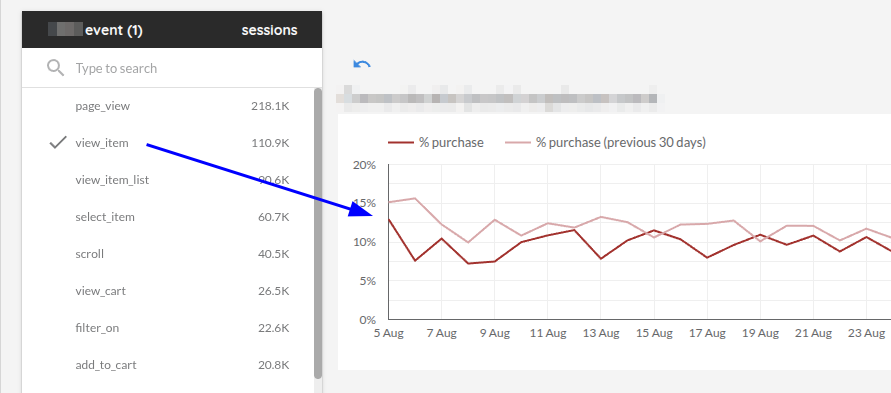
For every event, sessions counts the sessions containing it, and conversions.<event> counts the sessions where the configured conversion fired at or after the event's first occurrence - a micro-funnel per event:
Plotting the rates of all checkout steps in one chart gives a trended funnel:
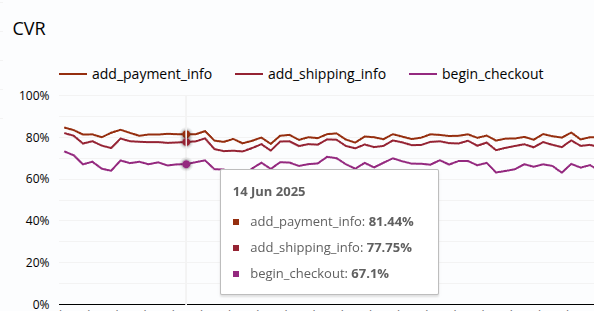
A conversion rate is only correct when filtered to a single event_name - one line or row per event. Rates are not summable across events or drilldown rows; re-derive them from conversions.<event> and sessions.
ga4_reporting_ecommerce_report
Granularity: 1 row per date x currency.
Monetary metrics (transactions, revenue, shipping, tax, purchasers, refunds) sit on their currency's row. Session-attributed metrics (sessions and the event columns) are not currency-scoped, so they sit on the currency IS NULL row. SUM() by date is therefore correct for both metric families - but never filter currency IS NOT NULL when you need session metrics.
Refunds appear twice, on purpose:
refunds/refund_valueare attributed to the refund's own date - safe under incremental runs, use these for reportingrefund_events/refunded_item_valueare attributed to the purchase date (a cohort view) and go stale for late refunds without a reprocess
purchasers counts distinct buyers per row (a repeat buyer counts once per day and per currency). aov is a ratio - recompute SUM(gross_revenue) / SUM(transactions) when re-aggregating.
ga4_reporting_pages_report
Granularity: 1 row per event_date x page_hostname x page_path x content_group, plus your configured dimensions.
Views, engagement, sessions and users are event-attributed; entrances and exits come from the sessionized landing/exit pages. With include_app_screens: true, app screen_view rows join under their own keys (content_type, screen_name, app_id) with a screen_views metric - page and screen grains never mix, and entrances/exits stay page-only.
ga4_reporting_consent_report
Granularity: 1 row per event_date, plus your configured dimensions.
Counts events by consent state (analytics_storage, ads_storage), measures cookieless traffic, and reports observed unconsented purchases (purchases are visible on cookieless pings - no estimation needed). estimated_unconsented_sessions and the extrapolated_* columns use a pageview-per-session estimator.
The estimates are meaningful only under Advanced Consent Mode - Basic consent mode sends no cookieless pings, so there is nothing to measure. Estimates are computed per dimension row; sparse rows get noisy.
ga4_reporting_currency_rates
Granularity: 1 row per rate_date x currency, observed dates only.
Recovers the daily rate Google applied to your events as SUM(value_in_usd) / SUM(value) over the configured currency.events - it is Google's own conversion, not a market FX feed. Days without qualifying events have no row (no forward-fill). conversion_rate_to_master derives same-day cross rates to your configured master_currency. Intended as a BI join source on (date, currency).
ga4_reporting_item_sales_report
Granularity: 1 row per report_date x property_id x currency x item attributes (item_id, item_name, item_brand, item_variant, item_category).
Purchase-attributed item facts from deduplicated transactions, plus refund-date-attributed item refunds. Pure sales reporting - funnel and list attribution live in the GA4 Item Funnel module.
GA4's item-level revenue does not always reconcile with transaction-level revenue - the export itself disagrees. The item table mirrors the item source exactly; do not expect it to roll up to the ecommerce report to the cent.